
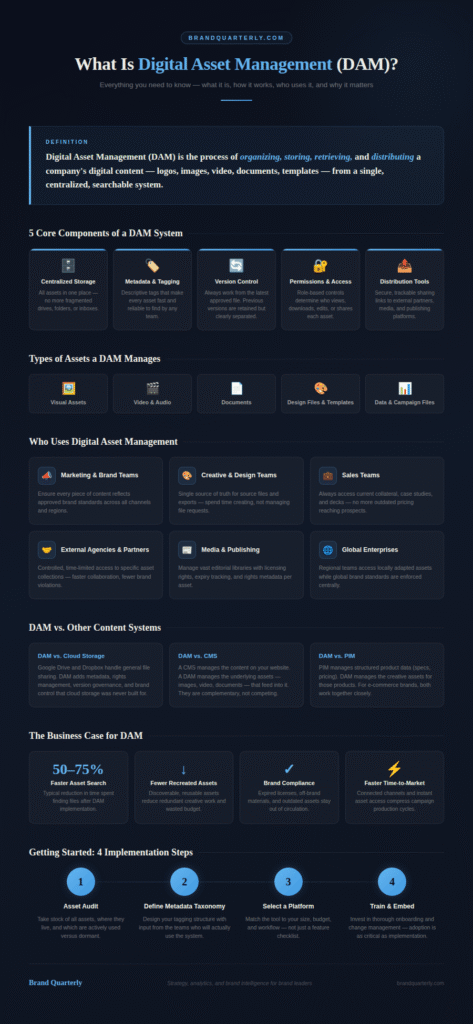
Digital asset management (DAM) is the process of organizing, storing, and distributing a company’s digital content from one central system. Brands use DAM to manage logos, images, videos, documents, and templates. Teams find what they need in seconds instead of searching through shared drives or email threads. For any organization creating content at scale, digital asset management is a critical operational investment.
The concept is simple: put all brand assets in one place, make them searchable, and control who uses them. In practice, a modern DAM platform does far more than store files. It enforces brand consistency, speeds up creative workflows, and cuts duplicated effort. As content volumes grow, DAM becomes essential brand infrastructure — not a luxury.
Why DAM Matters for Growing Brands
Many teams outgrow shared drives faster than they expect. Folders become disorganized, files get lost, and outdated assets circulate unnoticed. DAM solves this by creating a governed, searchable system that scales with your brand. Moreover, it gives leaders clear visibility into how assets move across every team and channel.
The 5 Core Components of a DAM System
Every serious digital asset management system shares five core components. Together, these building blocks create an organized and searchable content ecosystem. Understanding them helps you evaluate platforms more confidently.
Centralized Storage
Centralized storage is the foundation of any DAM system. All digital assets live in one place, and authorized users can access them from any device or location. This eliminates fragmented file structures — the mix of local drives, cloud folders, and personal storage that slows teams down. Additionally, when you update an asset, everyone immediately works from the correct version.
Metadata and Tagging
Metadata turns a library of files into a smart, searchable system. Each asset carries descriptive information — file type, creation date, campaign name, usage rights, and target audience. This allows users to filter and find exactly what they need without manually browsing thousands of files. Strong brand guidelines typically shape how metadata schemas get built, so assets reflect how the brand actually operates.
Version Control
Version control ensures teams always work with the most current, approved version of the file. The DAM retains previous versions while clearly marking the latest one. This matters especially for logos, product imagery, and legal documents. Using an outdated version of any of these can cause serious compliance or consistency problems.
Permissions and Access Control
Permissions determine who can view, download, edit, or share each asset. Administrators set role-based access — a freelance designer may download templates but not edit master files. Meanwhile, a regional manager may access local assets but not global campaign materials. This governance layer protects brand integrity without creating friction for your team.
Distribution and Sharing Tools
Distribution tools allow teams to share assets directly from the DAM to external partners, agencies, and media outlets. Instead of compressing files and sending emails, users generate controlled, trackable sharing links. These links maintain brand governance even when assets leave the organization.
What Types of Assets Does DAM Manage?
A common misconception is that digital asset management only applies to image files. In reality, a DAM handles the full range of content a modern brand produces. Understanding this scope shows why DAM matters across so many teams and industries.
Visual Assets
Visual assets are the most obvious category. Photographs, illustrations, infographics, icons, banner ads, social graphics, and packaging artwork all belong here. For brand-driven organizations, visual assets are the highest-volume content type. They are also the most vulnerable to misuse without proper management. Your brand identity fundamentals depend on those assets being available, up to date, and consistently applied at all times.
Video and Audio Assets
Video and audio assets include brand films, product demos, podcast recordings, jingles, and raw footage. These files are typically the largest in terms of storage. They also require the most careful management, because they exist in multiple formats, resolutions, and lengths for different channels. Furthermore, video production is expensive — losing or misplacing footage can waste a significant portion of the budget.
Document Assets
Document assets cover presentations, sales decks, case studies, white papers, brand guidelines, legal templates, and press kits. These are the files most likely to circulate as outdated versions. A prospect receiving last year’s pricing deck or an agency working from old brand guidelines creates real business risk. DAM prevents this by keeping everyone on the same current version.
Design Files and Templates
Design files include editable source files — layered PSDs, AI files, InDesign layouts, and Canva or PowerPoint templates. Keeping these in a DAM alongside final exports means designers can quickly find originals whenever the team needs to update them. As a result, teams stop recreating assets from scratch just because the source file went missing.
Data and Campaign Files
Data and campaign files include spreadsheets, research reports, audience insights, and competitive analyses. As brands become more data-driven, these assets are increasingly part of the content ecosystem. Teams need quick, organized access to this material — especially during campaign planning and strategy reviews.
How Digital Asset Management Works Day to Day
Understanding how digital asset management functions in practice shows why well-implemented systems create such a noticeable operational shift. The workflow follows four main stages.
Asset Ingestion
The DAM workflow begins when a new asset is added to the system. A new set of product photographs, for example, goes through an ingestion process. During ingestion, the team uploads the asset, adds metadata, assigns it to the correct collection, and links it to the relevant campaign or project. This upfront organization is what makes fast, reliable retrieval possible later. Skipping it creates the same mess the DAM was meant to solve.
Search and Discovery
Once assets are in the system, search and discovery become the main user experience. A marketing manager can filter by category, campaign, date, usage rights, and file type to find the right image in seconds. A content team can search by keyword to surface all previous assets on a given topic, avoiding duplicate work. This searchability directly boosts creative productivity. Scaling digital brand management becomes far more realistic when teams spend their time creating rather than hunting.
Distribution and Sharing
Distribution is where DAM platforms multiply their impact. Users share assets directly from the system through secure, permission-controlled links. Some platforms integrate with content management systems, social media schedulers, and e-commerce platforms. Assets then flow automatically to the channels that need them. This removes the manual transfer step that slows down most teams.
Analytics and Reporting
Analytics and reporting close the loop on the DAM workflow. Modern platforms track which assets teams download, by whom, and how often. Brand managers can identify top-performing assets, retire unused ones, and spot gaps in the library. Consequently, this visibility turns DAM from a passive storage tool into an active part of brand monitoring automation.
Who Uses Digital Asset Management?
Digital asset management is not only for large enterprises. The technology is now accessible and relevant to organizations of all sizes — mid-market brands, agencies, nonprofits, media companies, and fast-growing startups all benefit from it.
Marketing and Brand Teams
Marketing and brand teams are typically the primary DAM users inside any organization. They rely on it to ensure every piece of content reflects the approved brand — the correct logo, the right color palette, the current campaign imagery. For teams managing digital brand management across multiple channels and regions, DAM is the backbone that makes consistency achievable at scale.
Creative and Design Teams
Creative teams benefit from DAM as a single source of truth for source files, approved assets, and brand standards. Instead of handling repeated requests for the same file, designers direct colleagues to the DAM. They then maintain their focus on creation rather than file management. This shift alone significantly improves team morale and output quality.
Sales Teams
Sales teams use DAM to access up-to-date collateral, case studies, and presentation templates. When sales materials live in a governed DAM system, reps always present with current content. Incorrect pricing or discontinued product information reaching a prospect is a real risk without proper asset governance. DAM eliminates that risk entirely.
External Partners and Agencies
Brands can give agencies and partners controlled, time-limited access to specific asset collections. This speeds up collaboration and reduces violations of brand guidelines. Additionally, asset usage stays trackable — something that is impossible with ad hoc email attachments or temporary cloud links.
Media and Publishing Companies
Media and publishing companies use DAM to manage large editorial libraries with licensed content. In these industries, licensing rights carry commercial and legal significance. DAM attaches rights metadata to individual assets, flags expiry dates, and restricts access to expired licenses. This protects the organization from costly compliance failures.
DAM and Brand Consistency
The most strategically significant benefit of digital asset management is brand consistency. Brand inconsistency — using the wrong logo, applying off-brand colors, or sharing outdated messaging — is more damaging than most organizations realize. Every inconsistent touchpoint erodes brand clarity and makes it harder to build strong audience associations.
How DAM Removes Inconsistency at the Source
DAM addresses the root cause of the inconsistency. When every team — internal and external, local and global — draws assets from the same governed library, the risk of inconsistency drops sharply. Approved assets carry a clear label. Outdated assets get archived or restricted. New brand updates reach the entire organization at once instead of trickling out through email chains.
This matters especially for brands operating across multiple markets or channels. A global brand with regional teams faces a significant consistency challenge without a centralized system. With DAM in place, regional teams access locally adapted assets while global standards are enforced at the top level. This balance is something that brand architecture decisions depend on getting right, both strategically and operationally.
Consistency Builds Customer Trust
Brand consistency also strengthens brand trust through customer experience. When customers encounter a coherent brand across every touchpoint — social media, packaging, sales presentations — their confidence in that brand grows. DAM is the infrastructure that enables this coherence, even as content volumes and distribution channels continue to expand.
Key Features to Look for in a DAM Platform
Not all digital asset management platforms deliver the same value. Choosing the right one depends on your organization’s size, complexity, and workflow. However, certain features consistently separate strong DAM systems from weak ones.
AI-Powered Search and Tagging
AI-powered search and tagging is now a standard expectation rather than a premium feature. Modern DAM platforms use artificial intelligence to tag images automatically based on visual content — objects, colors, faces, and scenes. This dramatically reduces the manual metadata work required during ingestion. The value grows as asset libraries expand into the tens of thousands.
Integrations With Your Existing Tools
Strong integrations determine how smoothly DAM fits into your current workflow. The best platforms connect natively with Adobe Creative Cloud, Asana, Monday.com, content management systems, social media tools, and e-commerce platforms. When assets flow automatically between systems, productivity gains compound quickly. This integration layer also supports automating competitive monitoring systems and broader marketing automation.
Customizable Metadata Schemas
Customizable metadata schemas let organizations tag assets in ways that reflect their specific brand structure and campaign taxonomy. A rigid, generic system that doesn’t align with how your team actually works creates friction and low adoption. Flexibility here is not a nice-to-have — it is essential for long-term DAM success.
Usage Rights Management
Usage rights management is non-negotiable for organizations working with licensed photography or contracted talent imagery. A strong DAM attaches licensing information to assets, flags expiring rights, and restricts access to lapsed licenses. Without this, the organization faces avoidable legal and financial risk.
Brand Portals
Brand portals give external partners a curated, publicly accessible collection of approved assets they can browse and download on their own. They significantly reduce the administrative burden on brand teams. Partners get what they need through a self-service portal. Brand teams stop fielding individual asset requests by email.
DAM vs. Other Content Systems
A common source of confusion is how digital asset management relates to other content systems organizations already use. Understanding the differences helps clarify where DAM fits in your technology stack.
DAM vs. Cloud Storage
Cloud storage platforms like Google Drive, Dropbox, and SharePoint handle general file sharing and collaboration. They do not manage brand assets at scale. They lack robust metadata schemas, version control for creative assets, usage rights management, and brand governance features. Many organizations start with cloud storage and move to DAM once content volumes outgrow what general file sharing can handle.
DAM vs. CMS
A content management system (CMS) manages the content that appears on your website — pages, posts, and product listings. A DAM manages the underlying assets — images, videos, and documents — that feed into that content. The two systems complement each other. Many organizations connect them via integration so assets flow directly from the DAM into the CMS workflow.
DAM vs. PIM
Product information management (PIM) systems handle structured product data — specifications, pricing, descriptions, and attributes. DAM handles the creative assets associated with those products. For e-commerce brands, both systems work closely together. Product images and video sit in the DAM while product data lives in the PIM.
The Business Case for Digital Asset Management
The business benefits of digital asset management are measurable and consistent across industries. The question is not whether DAM delivers value — it does. The real question is how quickly that value materializes for your organization.
Time Savings
Time savings are the most immediately quantifiable benefit. Marketing and creative professionals spend a significant part of their week searching for files or recreating lost assets. A well-implemented DAM eliminates most of that wasted time. Organizations commonly report a 50–75% reduction in asset search time after implementation.
Lower Asset Recreation Costs
When teams cannot find assets, they recreate them — wasting creative time and budget. DAM makes existing assets discoverable and reusable. This directly supports branding ROI by ensuring that creative investment generates compound returns rather than being repeatedly written off as redundant work.
Brand Compliance and Risk Reduction
Brand compliance and risk reduction translate into avoided costs that are difficult to quantify but potentially enormous. Using expired licensed photography, distributing outdated product information, or publishing off-brand materials all carry real financial and reputational risk. DAM governance features substantially and systematically reduce these risks.
Faster Time-to-Market
Faster time-to-market is a competitive advantage that compounds over time. When assets are instantly accessible and distribution channels connect directly to the DAM, campaign production cycles shorten. Teams that consistently reach the market ahead of competitors gain a meaningful edge — especially in fast-moving categories where timing matters.
How to Get Started With Digital Asset Management
For organizations approaching their first DAM implementation, the process can feel complex. However, a successful rollout does not require perfection upfront. It requires a clear plan, strong organizational buy-in, and a commitment to building consistent habits around the new system.
Step 1: Run an Asset Audit
Start by taking stock of every asset your organization currently holds, where those files live, and which teams actively use them. This audit surfaces redundancies, outdated files, and gaps in the library that are important to understand before migration. The process closely mirrors a broader brand audit and often complements it well.
Step 2: Define Your Metadata Taxonomy
Before choosing a platform, design your tagging structure with input from the teams who will use the system daily. They know how to search for assets and what filters they actually need. Getting this right upfront avoids enormous amounts of remediation work later. A poorly designed taxonomy creates the same chaos that the DAM was meant to replace.
Step 3: Select the Right Platform
Match the platform to your size, budget, and workflow complexity — not just a feature checklist. Entry-level DAM tools serve small teams well without the cost of enterprise platforms. As needs grow, investing in a more capable system pays off clearly. Evaluate platforms against your real workflow requirements to reach far better outcomes.
Step 4: Train Your Team and Drive Adoption
A DAM only delivers full value when people use it consistently. Thorough onboarding, clear documentation, and active encouragement of adoption matter as much as technical implementation. Teams that understand why the system exists — not just how to click through it — adopt it far more readily. They also build better habits that sustain long-term value.
Conclusion
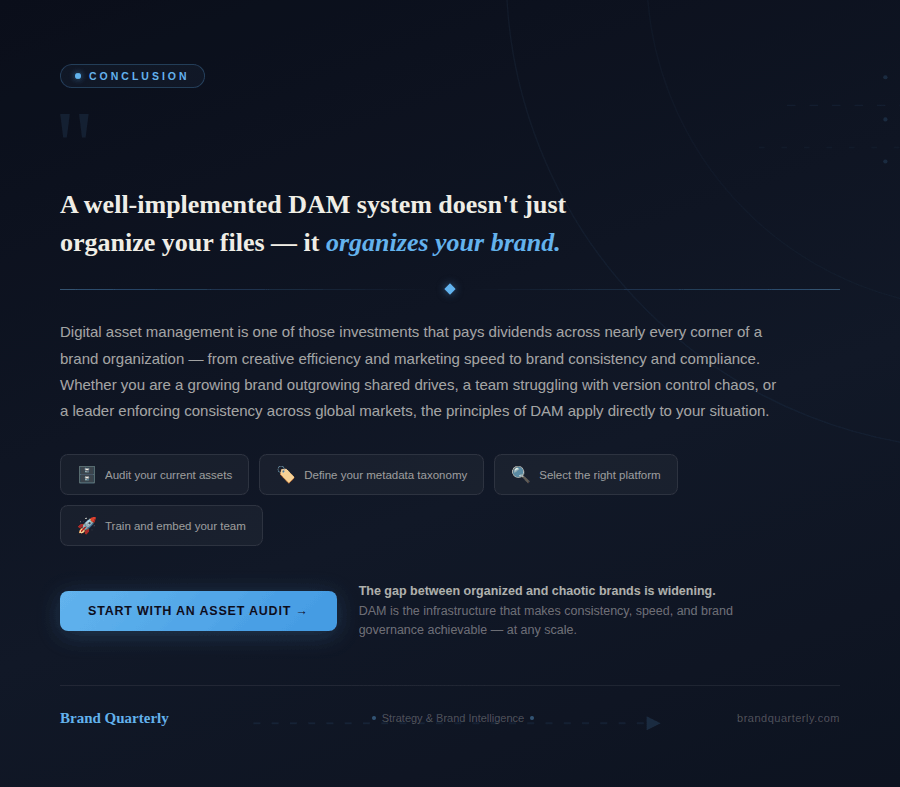
Digital asset management is an investment that pays dividends across nearly every part of a brand organization — from creative efficiency and marketing speed to brand consistency and compliance. Understanding what DAM is, how it works, and who benefits from it is the first step toward a decision that can fundamentally transform your brand operations.
Whether you run a growing brand that has outgrown shared drives, a marketing team dealing with version-control chaos, or a global organization trying to enforce standards across markets, digital asset management directly applies to your situation. A well-implemented DAM system does not just organize your files. It organizes your brand.
