
AI and automation in customer experience have moved from experimental to essential. Brands that systematically adopt these tools outperform those that rely solely on manual processes. They respond faster, personalize better, and scale more consistently across every touchpoint. If you lead a brand or CX team, understanding how to implement AI in your workflows is no longer optional — it is a core strategic competency.
This guide walks through the practical steps to bring AI and automation into your customer experience operations. It covers where to start, which workflows to prioritize, how to maintain brand voice, and how to measure what is working. Each section focuses on action, not theory.
What Makes AI Different in CX
AI does not just speed up existing processes. It changes what is possible. Traditional automation handles repetitive tasks with fixed rules. AI learns from data, adapts to context, and makes decisions at a level of nuance that rule-based systems cannot match. Together, AI and automation create a CX operation that is fast, consistent, and continuously improving.
Start With a CX Audit Before Adding Any AI
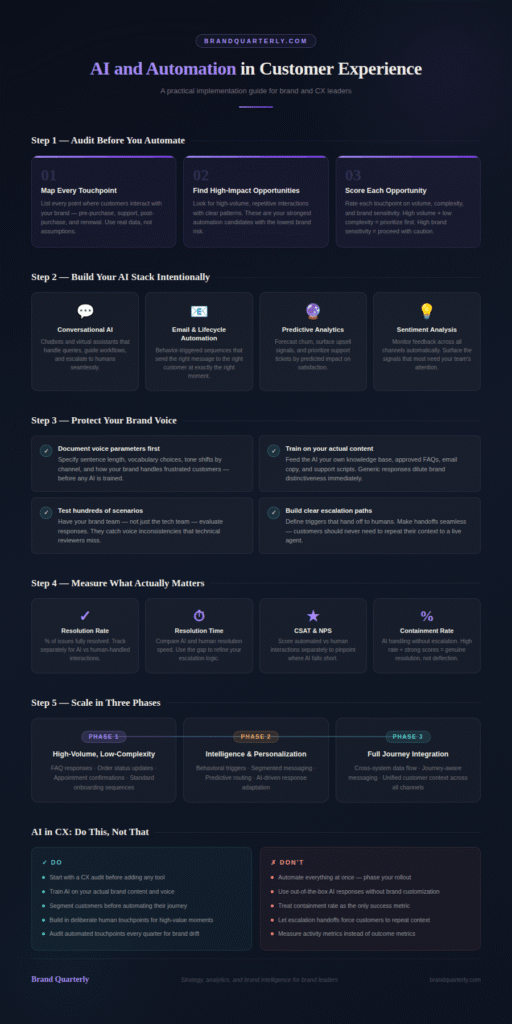
Before you implement a single AI tool, audit your current customer experience. Rushing into automation without this step is one of the most common and costly mistakes CX teams make. You need a clear picture of where friction exists, where volume is highest, and where inconsistency damages your brand. A thorough brand audit gives you exactly this foundation.
Map Every Customer Touchpoint
Start by listing every touchpoint where customers interact with your brand. Include pre-purchase research, website visits, email communications, social media, customer support, post-purchase follow-up, and renewal or re-engagement moments. Do not rely on assumptions. Talk to your support team, review customer feedback, and use session recording tools to see how customers actually behave. A complete customer journey map gives you the most accurate starting point.
Identify Your Highest-Impact Automation Opportunities
Once you have mapped the journey, look for patterns. Identify where customers face the most friction. Spot the touchpoints that generate the highest volume of repetitive interactions. Find the stages where response time has the greatest impact on satisfaction scores. These are your highest-impact automation opportunities. Prioritize them first rather than automating everything at once.
Score Each Opportunity
Score each opportunity across three dimensions. First, assess the volume — how many customer interactions does this touchpoint handle per week? Second, assess the complexity — how varied are the customer inputs at this touchpoint? Third, assess the brand sensitivity — how much does the quality of this interaction affect customer trust? High volume, low complexity, and moderate brand sensitivity make the strongest case for early automation.
Build Your AI and Automation Stack Intentionally
Choosing the right tools is critical. The AI and automation market is large and noisy. Many platforms promise transformative results but deliver complexity without clear ROI. Build your stack around your specific CX gaps rather than chasing the most sophisticated technology available.
Start With Conversational AI
Conversational AI — chatbots and virtual assistants powered by large language models — is the most widely applicable entry point for CX automation. Modern conversational AI handles a broad range of customer queries without human intervention. It answers product questions, processes simple requests, guides users through common workflows, and seamlessly escalates complex issues to human agents. For teams managing brand trust through customer experience, conversational AI is particularly powerful when trained on your specific brand voice and knowledge base.
Add Email and Lifecycle Automation
Email and lifecycle automation tools send the right message to the right customer at the right moment. They trigger communications based on customer behavior — a welcome sequence when someone signs up, a follow-up after a purchase, a re-engagement message when activity drops. These tools remove the manual effort of tracking individual customer moments. They also ensure no customer falls through the cracks between touchpoints.
Layer in Predictive Analytics
Predictive analytics tools use historical customer data to forecast future behavior. They identify customers at risk of churn, highlight upsell opportunities, and prioritize support tickets based on predicted impact. This shifts your CX operation from reactive to proactive and aligns with digital brand awareness by enabling early action on key signals.
Use AI for Sentiment Analysis
Sentiment analysis tools monitor customer feedback across every channel — support tickets, reviews, social media, survey responses, and chat transcripts. They automatically classify feedback by emotion, topic, and urgency. Your team then focuses on the signals that need the most attention, rather than manually reading through thousands of data points. This directly supports online reputation management for brands, giving you real-time visibility into how your brand registers emotionally with customers.
Implement Conversational AI Without Losing Your Brand Voice
Conversational AI creates real risk for brands that implement it carelessly. A chatbot that sounds robotic, inconsistent, or off-brand damages customer trust faster than no automation at all. Getting this right requires deliberate design, not just technical setup.
Define Your Brand Voice Parameters First
Before training any conversational AI tool, document your brand voice in precise, usable terms. Go beyond adjectives like “friendly” or “professional.” Specify sentence length preferences, vocabulary choices your brand uses and avoids, tone shifts between channels, and how your brand handles negative or frustrated customers. Your brand messaging framework should inform every parameter you set. The AI needs specific constraints, not vague descriptions.
Train on Your Actual Brand Content
Use your own content to train your conversational AI. Feed it your existing knowledge base, approved FAQ documents, top-performing email copy, support scripts, and product descriptions. The more your brand’s actual language fills the training data, the more naturally the AI reflects your voice. Generic, out-of-the-box responses immediately dilute brand distinctiveness.
Test Rigorously Before Going Live
Run your conversational AI through hundreds of test scenarios before any customer encounters it. Test common queries, edge cases, frustrated customer inputs, and sensitive topics like complaints or refund requests. Have members of your brand team, not just your tech team, evaluate the responses. They will catch voice inconsistencies that technical reviewers miss. Fix every inconsistency before launch, not after.
Build Clear Escalation Paths
Every conversational AI implementation needs clear escalation paths to human agents. Define the triggers that escalate a conversation — sentiment dropping below a threshold, a query type the AI cannot handle confidently, or a customer requesting a human. Make the handoff seamless. Customers should not have to repeat their context when a human takes over. A poor escalation experience can undo everything your AI interaction has built.
Automate the Customer Journey Without Losing Personalization
Automation and personalization are not opposites. Done well, automation enables personalization at a scale no manual process could achieve. The key is designing your automation logic around meaningful customer signals rather than superficial data points.
Segment Before You Automate
Automation without segmentation delivers generic experiences at scale — which is worse than no automation at all. Before building any automated journey, define your customer segments clearly. Use behavioral data, purchase history, engagement patterns, and stated preferences to meaningfully group customers. Your customer segmentation strategy directly determines how relevant your automated communications feel to each recipient.
Design Behavior-Triggered Workflows
Behavior-triggered workflows respond to what customers actually do rather than sending messages on a fixed schedule. A customer who views a pricing page three times in one week is showing clear intent. A customer who opens every email but never clicks needs different content, not the same message repeated. Build your automation logic around these behavioral signals. Each trigger should connect directly to a customer need or intent rather than an internal marketing calendar.
Personalize at Every Automation Layer
Personalization in automated CX extends beyond using a customer’s name. Leverage purchase history to recommend relevant products, support history to anticipate questions, and channel preferences to communicate effectively. The more specific the personalization, the more customers feel recognized. Automated brand storytelling should create a tailored, not templated, experience.
Avoid Over-Automation
Over-automation is a real and common failure mode. When every interaction becomes automated, customers feel the absence of human judgment. Set deliberate limits on the number of automated touchpoints any customer receives in a given period. Build in moments where human outreach happens — especially for high-value customers, post-complaint recovery, and milestone moments like anniversaries or significant purchases. These human interventions carry disproportionate weight precisely because they stand out against an automated backdrop.
Use AI to Improve Customer Support Operations
Customer support is one of the highest-impact areas for AI and automation in customer experience. Support interactions carry significant emotional weight. Getting them right builds loyalty. Getting them wrong destroys it. AI can substantially improve both the efficiency and quality of support when deployed thoughtfully.
Implement AI-Powered Ticket Routing
AI-powered ticket routing classifies incoming support requests automatically and assigns them to the right agent or queue. It removes the manual triage step that slows resolution times. It also ensures that senior agents handle complex, high-value, or emotionally charged tickets rather than whoever happens to be free. Faster routing means faster resolution, which is one of the strongest drivers of customer satisfaction scores.
Use AI to Assist Human Agents
AI agent-assist tools support human agents in real time by surfacing relevant knowledge base articles, suggesting response language, and flagging declining customer sentiment. Agents become faster and more consistent while retaining necessary human judgment. The combination of AI capability and human empathy drives the strongest CX operations.
Deploy Proactive Support
Proactive support uses AI to identify and resolve customer issues before customers need to contact you. If your data shows that customers who complete a certain onboarding step within 48 hours have dramatically lower churn rates, automate a nudge for those who have not reached that step. If your system detects a service disruption affecting a specific customer segment, proactively alert those customers rather than waiting for complaint volume to spike. Proactive support shifts the relationship from reactive problem-solving to genuine partnership.
Measure AI and Automation Performance in CX
Every AI and automation implementation needs a clear measurement framework. Without one, you cannot distinguish what is working from what merely looks busy. Define your metrics before deployment, not after.
Track Resolution Rate and Time
Resolution rate — the percentage of customer issues fully resolved — and resolution time are the most direct measures of support automation effectiveness. Track both automated and human-assisted interactions separately. This comparison shows where AI genuinely adds value and where human involvement still drives better outcomes. Use these findings to continuously refine your escalation logic.
Monitor Customer Satisfaction Scores
Track CSAT (Customer Satisfaction Score) and NPS (Net Promoter Score) separately for automated and human-handled interactions. Many teams discover that automated interactions score consistently well for simple transactions but below average for complex or emotionally charged ones. This data tells you exactly where your automation logic needs adjustment. It also tells you where not to automate further. Your brand equity models and metrics provide the broader framework for interpreting these scores in the context of overall brand health.
Measure Containment Rate
Containment rate measures the percentage of customer interactions that AI handles without human escalation. A high containment rate with strong satisfaction scores is the target — it means AI is genuinely resolving issues, not just deflecting them. A high containment rate with low satisfaction scores signals the opposite problem: customers are stuck with an AI that cannot truly help them. Carefully distinguish between these two scenarios in your reporting.
Review Conversation Quality Regularly
Most teams overlook automated conversation quality review — yet it is critically important. Set up a regular process for your team to review a sample of AI-generated interactions each week. Look for voice inconsistencies, incorrect information, missed escalation opportunities, and moments where the AI response frustrated rather than helped the customer. This qualitative review catches what quantitative metrics miss. Use the findings to update your training data and response logic on an ongoing cycle.
Maintain Brand Consistency Across Automated Touchpoints
One of the most significant risks of CX automation is brand fragmentation. When different tools handle different touchpoints without a unifying brand layer, the customer experience becomes inconsistent. Each channel starts to feel like a different brand. This erodes the trust and recognition that brand investment works so hard to build.
Create a CX Brand Standards Document
Develop a specific CX brand standards document that covers tone, language, response structure, and escalation language for every automated channel. This document sits alongside your main brand guidelines but goes deeper into the specific conventions that automated systems need. It should include approved phrases, prohibited language, channel-specific tone adjustments, and examples of on-brand versus off-brand automated responses. Your brand guidelines provide the foundation — the CX document extends them into the operational detail that automation tools require.
Audit Automated Touchpoints Quarterly
Conduct a quarterly audit of every automated touchpoint in your CX stack. Check each one against your CX brand standards document. Automated systems drift over time — new edge cases get handled with improvised responses, training data becomes outdated, and platform updates change default behaviors. A regular audit catches drift early before it compounds into a significant consistency problem. This connects directly to brand monitoring automation — consistency monitoring should cover your owned automated channels, not just external brand mentions.
Align AI Outputs With Your Messaging Pillars
Every significant automated communication should reflect your core messaging pillars. These pillars exist to ensure that every customer interaction reinforces the same central brand ideas. Review your automated email sequences, chatbot response libraries, and proactive notification templates against your messaging pillars regularly. When automated content drifts away from these pillars, the cumulative effect on brand perception is significant — even if no single interaction seems obviously wrong.
Scale Your AI and CX Automation Over Time
Sustainable CX automation is built incrementally, not deployed all at once. Organizations that try to automate everything at once almost always encounter adoption problems, quality issues, and failures of brand consistency. A phased approach builds competence and confidence at each stage.
Phase One: Automate High-Volume, Low-Complexity Interactions
In the first phase, focus on high-volume, low-complexity, low-brand-sensitivity interactions. FAQ responses, order status updates, appointment confirmations, and standard onboarding sequences are strong starting points. These automations deliver immediate efficiency gains with minimal risk. They also give your team practical experience with AI tools before you apply them to higher-stakes interactions.
Phase Two: Add Intelligence and Personalization
Once phase one automations run smoothly, add intelligence and personalization. Introduce behavioral triggers, segmented messaging, and predictive routing. Move from simple rule-based responses to AI-driven responses that adapt to customer context. This phase is where the experience starts to feel genuinely personalized rather than merely automated. Scaling digital brand management through this phase requires tight coordination between your brand, CX, and technology teams.
Phase Three: Integrate Across the Full Journey
In the third phase, connect your automation across the full customer journey. Ensure that data flows between your conversational AI, email automation, support systems, and analytics platforms. A customer who contacts support should receive follow-up email communications that reflect that interaction. A customer who upgrades their subscription should immediately move into a different lifecycle sequence. Full journey integration is what separates a collection of automation tools from a genuine CX system.
Conclusion
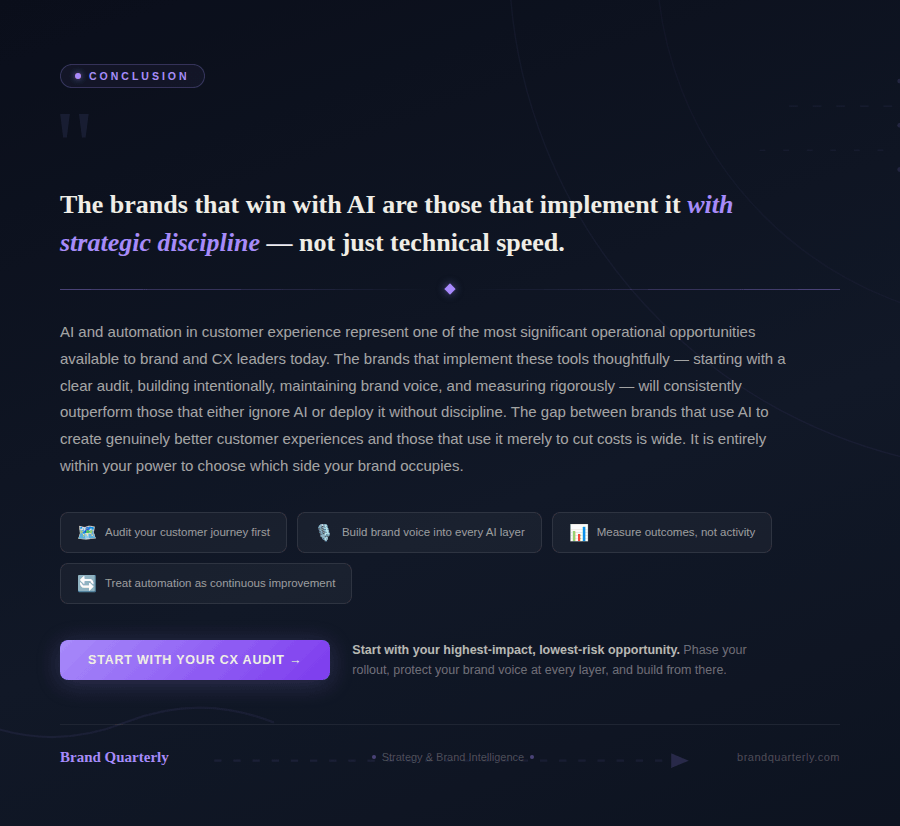
AI and automation in customer experience represent one of the most significant operational opportunities available to brand and CX leaders today. The brands that implement these tools thoughtfully — starting with a clear audit, building intentionally, maintaining brand voice, and measuring rigorously — will consistently outperform those that either ignore AI or deploy it without strategic discipline.
Start with your highest-impact, lowest-risk opportunities. Build your brand voice into every automated layer from day one. Measure what matters, not what is easy to count. And treat automation as a continuous improvement process rather than a one-time implementation. The gap between brands that use AI to create genuinely better customer experiences and those that use it merely to cut costs is wide — and it is entirely within your power to choose which side of that gap your brand occupies.
